
RepairTrackPro Feature Overview
RepairTrackPro Features
Repair Tracking & Workflow
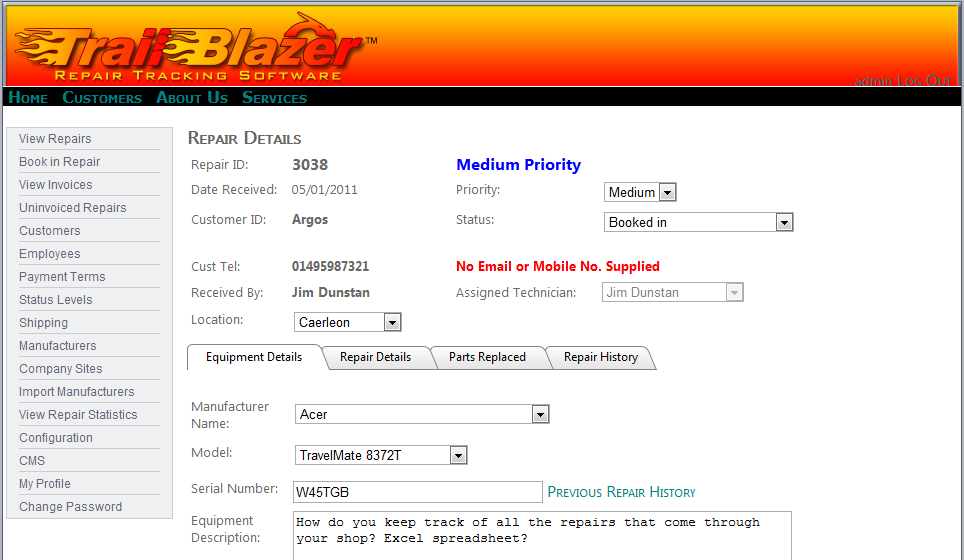
Book repairs in, assign them to technicians, and track progress through every stage. The Kanban board gives a visual overview of all repairs by status, while list views and admin dashboards provide detailed filtering and sorting. Technicians can be assigned automatically or manually, with optional SMS, email, or calendar notifications.
Messaging System
Technicians, managers and customers receive alerts by email and SMS at configurable stages in the repair cycle. Technicians are alerted when a new repair is assigned. Customers can be notified by SMS when their repair is completed or at any other stage — all fully configurable. SMS campaigns allow bulk messaging to targeted customer segments with A/B testing support.
Parts Inventory
RepairTrackPro includes a full parts inventory management system. Configure common parts, track stock levels, and receive low-stock alerts by email. The system can automatically generate purchase orders grouped by supplier when stock runs low. Parts can be added to repairs with automatic cost totalling.
Service Codes
Service codes can be configured for common repair or maintenance procedures (such as screen replacement, virus removal, etc.), which can then be added to repairs very simply. Costs can be applied to service codes, and totals are calculated appropriately.
Invoicing & Quotes
Generate professional invoices and quotes quickly and easily. Quotes can include parts, services, and labour, with a smart quote builder offering pre-built templates and price calculator. Invoices support multiple payment methods and track outstanding balances.
Analytics & Reporting
Comprehensive analytics dashboard with customer retention tracking, profit analysis, technician performance charts, and financial reports. Customer Satisfaction (CSAT) surveys can be automatically sent when repairs are completed.
RTM (Return to Manufacturer)
Track items returned to manufacturers with full cost management, status tracking, and analytics. Monitor RTM turnaround times and costs to identify recurring issues.
Appointment Scheduling
Built-in appointment scheduler with week and day views, and Outlook calendar sync for seamless integration with existing workflows.
Security Levels
Role-based access control with Technician, Manager, and Administrator roles. Technicians can only view items assigned to them. Managers can assign jobs, book repairs in and out, generate invoices, and amend all repair details. Administrators have full control over configuration, custom fields, user management, and system settings.
Repair History
If items have been booked in for repair before, RepairTrackPro provides a link showing the previous repair history, enabling you to quickly identify recurring problems.
Multi-Site & Multi-Client
RepairTrackPro supports businesses with multiple shops or sites. Employees are linked to a site, and repairs are automatically assigned to the site linked to the employee booking them in. Admin users and managers can see repairs across all sites.
Customer Portal
RepairTrackPro includes a fully-featured customer self-service portal where customers can track repair status in real time, book repairs online, view and accept quotes digitally, pay invoices online via Stripe/PayPal/Worldpay, view repair and invoice history, message your team directly, and receive push notifications on their phone. Trade customers can self-register and book their own items in, cutting down your admin time considerably. The portal is fully branded with your company logo and colours, and accessible from any device.
Custom Fields & Tabs
RepairTrackPro supports fully custom fields and custom tabs on the repair edit screen, with role-based visibility controls. Fields can be text, number, date, dropdown, or checkbox, and are configurable per client.
Barcode & Label Printing
Print QR code and Code128 barcode labels for asset tags, shelf labels, and intake receipts — all generated as inline SVG with no external dependencies.
Signature Capture
Capture customer signatures on collection or delivery, stored as base64 PNG images with signatory name, notes, and timestamp.
Time Tracking
Track time spent on each repair with a built-in timer or manual entry. Time entries can be marked as billable or non-billable, with hourly rate support.
REST API & Webhooks
Full REST API with 27 endpoints across 12 controllers, covering repairs, customers, invoices, quotes, parts, suppliers, purchase orders, service codes, sites, and more. API key management with scoped permissions and rate limiting. Webhook support for repair.created, repair.updated, repair.status_changed, quote.accepted, and quote.declined events.
Configurable
RepairTrackPro is highly configurable — currency symbols, SMS templates, email templates, custom fields, automation settings, and more can all be customised per client without code changes.
Mobile App API
RepairTrackPro provides a dedicated mobile app API for technicians and managers working in the field. With JWT-based authentication and a secure REST API, the mobile app enables your team to view assigned repairs, update status, send and receive messages on repair conversations, access customer details and repair history, log time against repairs, and receive push notifications for new assignments. The mobile API integrates with the same secure backend as the web application, with role-based access control and billing-tier management.
Contact us at sales@redbrooktech.com or call +44(0)1633 674291 to arrange a demo.